Home / Platform

One platform, from first submission to citable record.

The Article Management System is our own software, shaped by the editorial work we do on it. Four parts - submission and review, publishing, researcher identity, and preprints - share one record, so a paper is entered once and carries its history to publication.

Hands typing at a laptop keyboard

The journey of a paper

Every stage tracked, nothing lost in between.

1

Submit

Authors submit against the form and file types that venue has configured.

2

Review

Chairs assign reviewers and can run an automated similarity check; iThenticate/Turnitin integration is supported when the venue's licence is active; scores and comments come back on schedule.

3

Decision

Accept, revise or decline, with revision rounds fully tracked — and a word-level comparison of revised versions for the chair.

4

Camera-ready

Final files and any publication fee are collected and verified — every PDF automatically checked against the venue's own format profile, with a pre-filled IEEE eCopyright (eCF) hand-off for IEEE venues.

5

Production

Metadata, copyright and payment checked before a DOI is reserved.

6

Published

The article page goes live with its DOI and citations.

Printed pages, an open notebook and a pen on a desk

Publishing Module

A production line built for a permanent record.

The Publishing Module runs on its own subdomain and shares the AMS database, so there is exactly one canonical record for each publication. A paper reaches it only after it has cleared acceptance, camera-ready, and any fee due. Its public face is the Technology Fist Digital Library — the permanent home of every article, proceedings and preprint published on the platform.

  • Checklist-gated DOIs. Metadata, copyright and payment are verified before a DOI is reserved.
  • Fixed, checksummed PDFs and formal correction, retraction and withdrawal notices.
  • Every article three ways — a full-text HTML page, the PDF of record, and JATS 1.3 XML, the format PubMed Central requires and aggregators harvest.
  • Linked reference lists — each reference resolves to Crossref where we hold its DOI, and to Google Scholar otherwise.
  • Supplementary files — datasets, appendices and code published alongside the article.
  • Six citation styles plus BibTeX and RIS, Google Scholar tags and structured metadata.
  • Compiled proceedings volumes and a persistent public venue page per series.
Rows of shelved volumes in a library

Identity & early sharing

The Federation and the preprint server.

Every author gets a single Technology Fist identity with a member ID, profile and service record that follows them across every conference and journal. When work is ready to share early, the preprint server screens it and posts it open access on a permanent, citable page.

  • One member ID and profile across all venues, ORCID-linked.
  • A reviewer service record and downloadable certificates.
  • Moderated preprints posted with a clear not-yet-peer-reviewed label.

Beyond the plans

Seven optional modules, enabled per venue on request.

Acceptance letters and certificates on every plan; the Reviewer Network, portable peer review, indexing readiness and the live event layer on AMS Core Plus and AMS Core Plus & Publishing; TF LIVE rooms on those plans, bought per event.

These are not included in any plan's price and are off by default. A venue asks for the one it wants from its console and we enable it for that venue, so a conference carries only what it uses. TF LIVE is the one module with a published price: a per-event tier, bought from the same console and listed on the pricing page.

Acceptance letters

The venue's own acceptance and invitation letters for accepted papers, from a letterhead and template set once: one click for every accepted paper, or per paper addressed to all authors, to each author separately, or to the corresponding author. Each letter is numbered, stored as a PDF the authors download from their paper page, emailed on issue and verifiable by its code.

Every plan

Certificates

Presentation, attendance and publication certificates in the venue's own design — letterhead, border, wording, signatories, footer logos — issued for everyone eligible in one click or one at a time, numbered, stored as PDFs, emailed, with re-issue, email-again, revoke and a ZIP of all. Each carries a code anyone can verify on a public page. A certificate is a record of participation, not an academic qualification, and we neither issue nor accredit any.

Every plan

Federation Reviewer Network

Search members across the whole platform who have opted in to reviewing, by subject — with each one's review service record, current workload against their own declared capacity, and automatic conflict-of-interest checks. Reviewers control their own listing and every invitation is theirs to decline.

AMS Core Plus and above

Portable peer review

An author can carry the reviews of a decided paper to another venue on the platform. Each reviewer decides separately whether their report travels and whether their name goes with it; confidential comments to the chair never do. The receiving editor sees it as background, never as a decision.

AMS Core Plus and above

Indexing & compliance readiness

Score a venue against DOAJ, Scopus, Web of Science and COPE expectations using its own record, see exactly which criteria are unmet and how to fix each, and export an evidence pack for an application. Readiness only — the decision always rests with each service.

AMS Core Plus and above

Live event layer

Ticket types, delegate registration with capacity limits, on-site check-in, and attendance or presentation certificates issued only against a real record — a confirmed, checked-in registration (in the hall or in a TF LIVE room) or a paper genuinely accepted by the venue. These certify that someone attended or presented at a specific event; they are not academic qualifications, degrees or diplomas, and we neither issue nor accredit any.

AMS Core Plus and above

A TF LIVE room on a laptop: the presenter's screen with the chair and the next presenter beside it, the chair console, and the agenda with the paper that is on and its countdown

TF LIVE · optional module, bought per event

Your virtual sessions, inside the platform.

The programme builder already holds a conference's rooms — physical halls and virtual rooms — its sessions, presenters and the booklet. With TF LIVE, a virtual room runs on our own video server, embedded in AMS: the authors scheduled in it, the session chair, the venue's chairs and confirmed attendees join from the pages they already use, from the moment the room opens. Nothing to install, no account anywhere else, and nobody enters who is not on the programme's record.

  • Roles from the programme. The session chair moderates — lobby, mute all, spotlight, next paper with a countdown, end session; presenters share their screen; attendees watch and raise a hand.
  • The agenda beside the video. Which paper is on, who presents it, how many minutes remain, who has joined.
  • Q&A, polls and live captions. Questions in a queue with a private line to the chair, live polls, reactions, captions, and the presenter’s slides beside the video; a session summary is emailed to the chairs.
  • Attendance for the certificates. Who joined, when and for how long is recorded per person; it is what an attendance certificate is issued against.
  • Recording to the chair's own computer. One button, one MP4 on the chair's machine — nothing is recorded or stored on the server.
  • Priced per event. A tier is rooms in parallel × event days (prices); the builder keeps the programme within it. Venues that prefer their own Zoom or Teams rooms keep them as links, where the platform's policy allows.
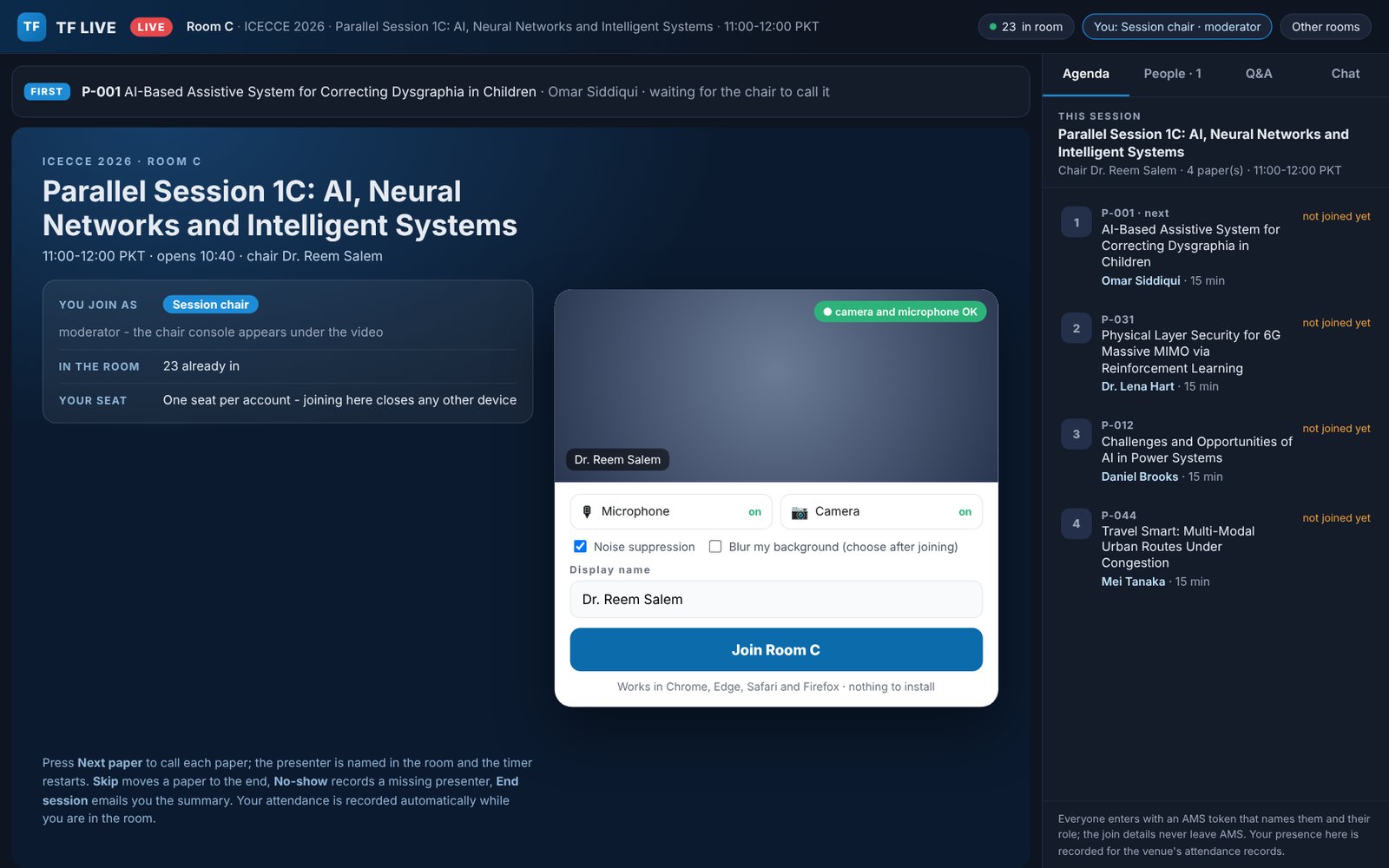
The TF LIVE pre-join screen: who you join as, who is in, a camera and microphone check
Before joining. Who you join as, who is in, a camera and microphone check — nothing to install.
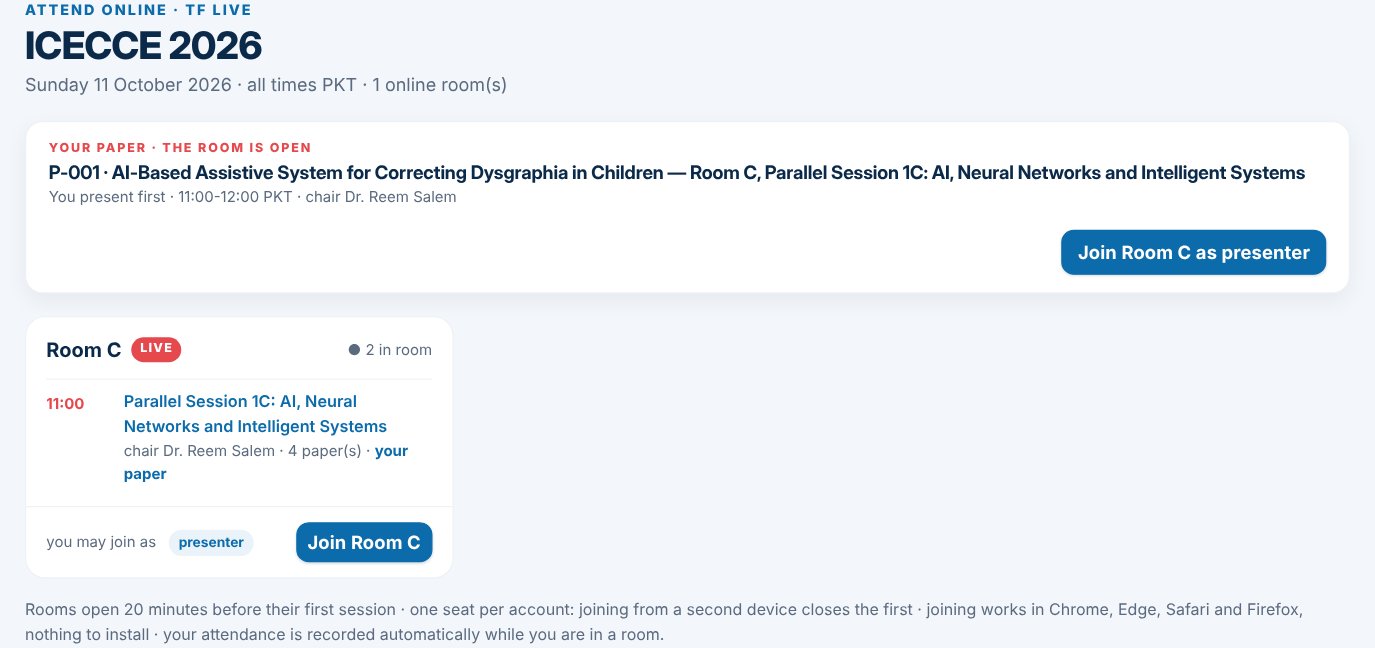
Attend online: every room of the day with a Join button, the author's own paper on top
Attend online. Every room of the day with a Join button from the moment it opens; your paper on top.
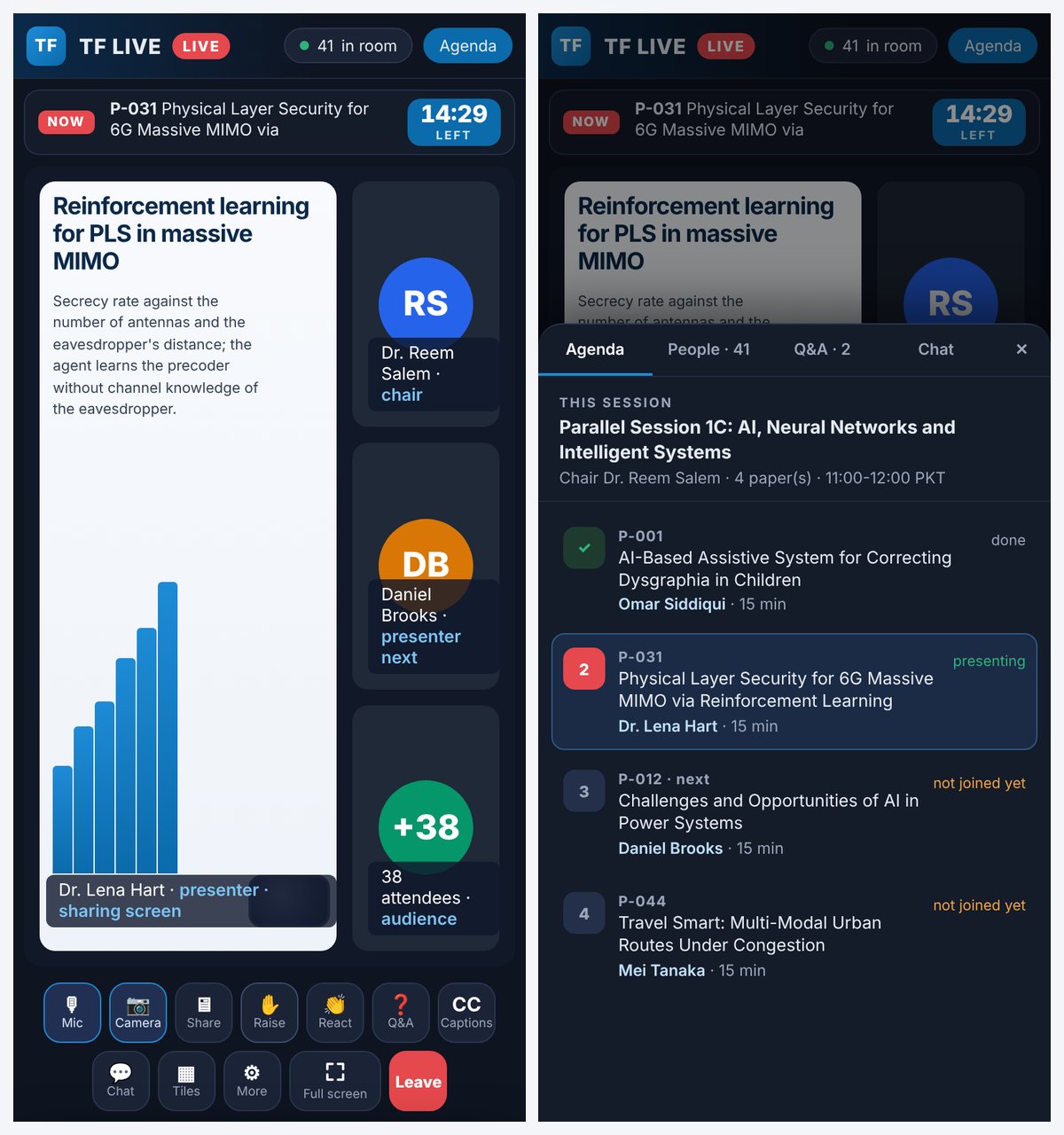
The TF LIVE room on a phone, with the agenda sheet open
On a phone. The video fills the screen; the agenda, the people, Q&A and the chat slide up from the bottom.

Built for every role

Each role gets its own console.

Each dashboard opens on the work that is waiting for that person, with the deadline attached.

Authors

Submit with a live readiness score, track each paper through a clear status stepper, message the venue's team — one conversation per paper — upload camera-ready files, pay fees, and approve proofs.

Chairs & editors

Assign reviewers, manage the pipeline, record decisions, message any paper's author, issue acceptance letters and certificates, and run the venue website, the programme and TF LIVE rooms on the plans that include them.

Reviewers

See assignments and deadlines in one place, review revised files with the author's response alongside.

Organisers

Register a conference or journal, manage registrations, and publish the proceedings.

Specialists

Faculty and industry experts who review publishing applications and uphold standards across venues.

Super Chair

Platform oversight: an action inbox, KPIs, and every approval and audit trail in one console.

"Accepted, camera-ready, paid, published. The same record moves through every step, so what an author sees, what a chair decides, and what a reader cites never drift apart."

The AMS principle

Put your venue on the platform.

Register a conference or journal, or ask us to migrate an existing one. The workspace is provisioned after payment - usually within minutes - and you configure the call for papers from there.